Archive for June, 2010

iPhone death grip frustrates iPhone4 buyers

Tuesday, June 29th, 2010

iPhone4G Death GripNo, your iPhone is not going to die, but be careful how you hold the phone for the best reception.

Originally thought to occur due to a design issue related to the wraparound antenna which is unique to the iPhone 4, it is now suspected to be a software problem as well as a design flaw. Reportedly, Apple technicians are on the case and there are rumors of a firmware update within the next week. Rumor has it that the issue is related to radio frequency calibration of the baseband. The problems are believed to occur when switching frequencies. Since the lag is (allegedly) not properly calibrated, the iPhone reports “no service” rather than switching to a frequency with the optimal signal to noise ratio.

The temporary solution is to hold the iPhone without fingers touching its antenna lines. Hands held close to the device’s antenna interrupts the signal to the point that the iPhone’s software can’t identify the connection. The update to the software should help alleviate some of the calibration issues but whether Apple decides to address the design issue won’t be known for a while – at least until Apple is able to release the update.

Have these issues hurt the sales of the iPhone4? Not at all. Sales have exceeded 1.7 million units since the iPhone4′s debut last week.

Turn your old PC fans into mini wind generators

Thursday, June 24th, 2010

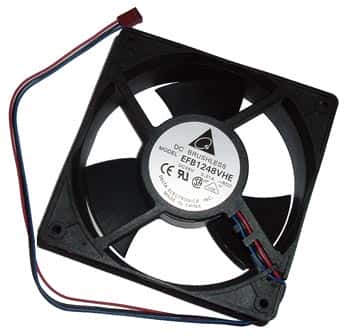
pc fanHere’s a great project that you can do either to experiment with wind turbines or to generate some energy! While the amount of energy produced is not overwhelming, this project can sure get your brain moving in the right direction.

The best thing about this project is that you probably already have everything you need lying around:

  • Thick plastic bottle
  • Old PC fan, bigger the better!
  • A few feet of small wire
  • A piece of wood about 1.5″ square and around 20cm long
  • Two lengths of steel tubing that slide inside of each other, about 1/2″
  • 6 Schottkey diodes
  • Epoxy
  • Super Glue
  • Zip ties
  • An old CD

You can find the full instructions including video here: http://www.instructables.com/id/Upcycle-your-old-PC-fans-into-mini-wind-generators/

If you want to have a kid-friendly wind turbine kit that already has all the pieces you need, we sell one of those. Our kits come with full instructions and all the materials needed to try your hand at creating a source of renewable energy – a wind turbine. The kit also comes with different experiments you can try with your wind turbine once it’s assembled. Great project for summer for the kids!

Using the iPad for business

Wednesday, June 23rd, 2010

Apple sold 3 million iPads in 80 days and is still having a hard time keeping the iPads in stock – a situation that is not totally unexpected, but even analysts are revising their projected sales figures upward based on what they call the ‘strongest product cycle in the company’s history, led by the iPad and iPhone 4′.

In terms of apps, there are over 11,000 apps already developed for the iPad. What is surprising the analysts is not the number of apps available but the number of businesses that are finding new ways to use the iPad. In fact it may be the unexpected adoption of the iPad by businesses that are finding so many useful business related apps that is fueling the increased demand.

If you are using the iPad for business, here’s a short list of recommended apps from Apple’s iWork suite of products (all available for $9.99/each):
-Pages
-Numbers
-Keynote

Also of note is Quickoffice ($10 through iTunes) which is an app that brings the usability of the iPad together with the best features of Office. Definitely worth checking out if you are using your iPad as a substitute for a traditional notebook computer while traveling.

Friday, June 18th, 2010

Keeping up with the newest smartphones

Thursday, June 17th, 2010

Buy a smartphone in May, chances are that you can buy a bigger – better – upgraded – faster – prettier – cooler phone in June. It’s been that way for years with PCs and notebook computers so why should the smartphone market be any different?

I’m still waiting on my backordered HTC Incredible, but we already have 3 of them in service on our plan. They’ve quickly become the all-time favorite phone at West Florida Components. Powered by a 1GHz processor, these phones are fast! Other favorite features are the 8MP camera, the GPS and the large touch screen. We’re already watching and waiting to see what other gee-whiz features will be added on to this Android-based phone in V2 but we all agree the single biggest improvement they could make to this phone would be an improved battery. Then we won’t have to close down unused apps to preserve battery life.

One thing is for sure: by the time my backordered HTC Incredible finally arrives, the next ‘gotta-have-it’ phone will already be available. That gives me another 2 years to figure out which phone I just have to have next!

Gift ideas for geeky dads under $100

Thursday, June 17th, 2010

Fathers Day is Sunday! Still struggling to find a gift? Here are some great ideas for that special geek father in your life for $100 or less:

Iomega iConnect Wireless Data Station
Easily connect up to 4 USB drives for wireless network access or remote access. Excellent for backing up all thumb drives, external drives and networked computers; then the external drive can be safely stored off-site. Access the stored and shared files from anywhere via the internet. All of this for under $100.

Jawbone Icon Bluetooth Headset
Jawbone is known for their excellent, comfortable bluetooth headsets which eliminate background noise from mobile phone conversations. Jawbone headsets are ‘intelligent’ – they can manage two calls from two different lines at the same time or quietly whisper the number of your incoming call. Their ICON collection is not only extremely functional, but they look great too! Treat Dad to a sleek new bluetooth headset for around $99.

Chumby One
What’s a Chumby One? It’s a WIFI-enabled alarm clock. It’s an internet radio player. It’s a digital photo viewer. It’s all of those and a bunch more. There are actually about 1500 apps that can be used on a Chumby. You do need WIFI access to operate all the internet options but for the price (around $100 at Costco), it’s a great gadget.

What is a wind turbine?

Friday, June 11th, 2010

A wind turbine is a rotary device that draws energy from the wind. This is different from a windmill, which draws energy from the wind but that energy is directly converted into mechanical energy used by some sort of machinery. Wind turbines are converted into raw electricity.

There are two main types, horizontal and vertical axis, of which the horizontal axis is more common. What are the differences between these two? Horizontal-axis turbines have the main rotor shaft and generator at the top of the tower. Horizontal axes must be pointed into the wind in order for them to work properly. However, the structure of the blades facing the wind also gives them a great angle of attack, which is the angle at which they have contact with the wind. This insures that the blades will be very efficient when converting wind to energy. Vertical-axis turbines are basically the same, except the axis is vertical, and they have the advantage of not having to face the wind.

Wind turbines are made up of three main components, the rotor component, generator component, and structural support component. The rotor component makes up about 20% of the cost, and consists of the blades. The generator component makes up 34% of the cost, and consists of the electrical generator, the control electronics, and usually a gearbox component for converting the low speed incoming rotation to high speed rotation which is better for generating electricity. Finally the structural support component makes up about 15% of the cost and consists of tower and rotor yaw mechanism.

Installing wind turbines can be a great way to save money on your electrical bills and create your own energy. They can be bought pretty inexpensively or you can even build your own and get the supplies to do it for even cheaper. If you’re interested in building a basic wind turbine to see how it works, you should buy an educational wind turbine kit to get you started.

(image: Flickr – therussiansarehere, Creative Commons)

Application information for Allen Bradley resistors

Tuesday, June 8th, 2010

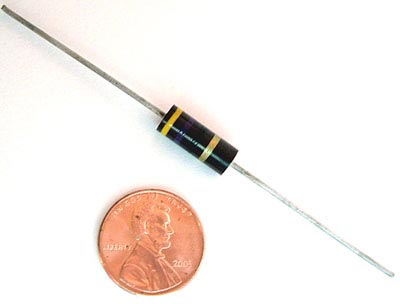
Allen Bradley resistors are one of the best sellers on the West Florida Components web site with good reason.

The following information has been compiled to aid in the everyday selection and application of Allen-Bradley hot molded resistors. The statements should be helpful in evaluating the use of all types of AB hot molded resistors in broad general terms, and are not to be interpreted to be precise or exact.

A comprehensive list is made of the standard normal resistance values in their available tolerance categories, the rated continuous working voltages for all hot molded types, the part numbers, and color codes – all information provided for all values from 1 ohm to 100M ohm, taking into account the available range of values for each type (as of 1985).
Allen Bradley Resistors

Allen Bradley Resistors

1 – Low value resistors exhibit less change due to humidity, temperature and voltage than high value resistors.

2 – Resistance changes due to increase in moisture content are always positive.

3 – Resistance changes due to humidity are temporary, and, in the case of Allen Bradley resistors, are reversible.

4 – Change of resistance which has occurred due to humidity may be essentially eliminated by conditioning the resistor at 100°C or by dry storage.

5 – The effects of humidity may be minimized by operating the resistor with as little as 1/10 rated wattage load.

6 – Resistance change due to load life is permanent and usually ultimately negative.

7 – Resistance change due to load life can be minimized 1% – 2% in many thousands of hours by 50% derating period. The same result can be attained by limiting the maximum operation surface temperature of the resistor underload to 100°C. Permanent resistance changes as a result of storage of temperatures below 100°C are negligible, even for extended time periods.

8 – Resistance change due to soldering is positive and may be permanent if the resistor has excessive moisture present in its body. It can be greatly minimized if resistors are dry at the time of soldering.

9 – The temperature characteristics of Allen Bradley resistors is positive above +80 and below -10.

10 – The temperature characteristics of Allen Bradley resistors is negligible from -10°C to +80°C.

11 – The voltage characteristic (negative) and the temperature characteristic (positive) of Allen Bradley resistors tend to cancel one another in an Allen Bradley resistor in an average operating conditions, where both significant voltage and elevated temperature are present.

12- The heat sink to which a resistor is connected affects its rating. Resistors operated in multiple should be derated unless adequate heatsinks are provided.

13 – The quality and reliability of Allen Bradley resistors is the same for, and independent of, any resistance tolerances shown on the resistor.

14 – Years of accumulated experience have shown that Allen Bradley hot molded resistors are unequaled for uniformity, predictable for performance, appearance, and freedom from catastrophic failure. Allen Bradley resistors are made by an exclusive hot molding process on automatic machines developed, built, and used only by Allen Bradley. There is such complete uniformity from one resistor to the next, million after million, and long term in-circuit performance can be predicted with usable accuracy. When used according to published ratings and recommendations, Allen Bradley hot molded fixed resistors will not open circuit nor exhibit erratic changes of resistance value. They are probably the most reliable of all electronic components.

This information was taken in part from the Allen-Bradley corporation reference book dated 1985.

How to extend battery life on your iPod

Monday, June 7th, 2010

Doesn’t it always seem to happen that the iPod battery dies just as you arrive at the gym? Here’s a sad truth: the more complex and feature-laden your mobile handheld device is, the quicker the battery is drained.

Fortunately, there are some non-essential apps and features that you can turn off on the iPod and other handheld devices that run on batteries.

battery

battery

Here’s a partial list of some apps and features on the iPod that can be adjusted to extend the life of your battery:

backlight
hold switch during playback
equalizer
sleep mode
creating playlists

View the video for step by step instructions.

Have any other suggestions we could add to this list? Let us know!

Also – stay tuned for a homemade solar powered charger for your iPod or any similar handheld mobile device. We’ll be providing instructions and selling the supplies in a kit very soon!