Category Archives: Newsworthy

Anti-static electronic component storage bins!

ESD Protection Bins

ESD Protection Bins

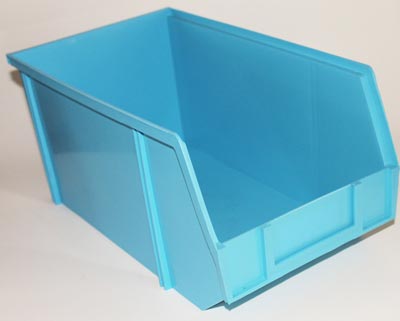
Great deal alert! We’re parting with some of our static dissipative stacking bins – taking them out of service in our warehouse. There’s still plenty of life available in these bins so grab them while you can at 60% off the price of new bins.

The bins are perfect for storing all your sensitive electronic components and supplies. Also ideal for a warehouse environment where you need some ESD protection.

Here are the larger size bins: Large Anti-Static Stacking Bin

And here are the medium size bins: Medium Anti-Static Stacking Bin

The price on these bins when new are $26 for the medium size and over $30 for the large size. Both sizes are stackable with an open hopper on the front side for easy access to the contents of the storage bin. Limited availability – only about 200 left.


New radial electrolytic capacitor assortment available!

Radial Electrolytic Capacitor Assortment

Radial Electrolytic Capacitor Assortment

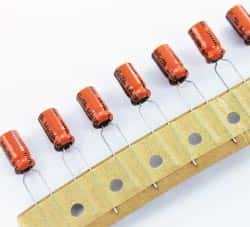
By popular request we’ve added an additional radial electrolytic capacitor assortment to our lineup of available products. Like our other capacitor kits, this assortment has a big range of capacitances and voltages supported. And like our other assortments, every value is individually bagged and labeled.

But here’s where this kit differs from our other previous kits – we are now able to provide a list of manufacturers and temperature ratings for this assortment so you can be sure that the capacitors in this assortment meet your needs. We’ve designed this assortment to be perfect for anyone’s workbench or ideal in a classroom setting.

Capacitor values range from 0.22uF 50V to 6800uF 10V. There are about 245 radial electrolytic capacitors included spanning 27 different values. Some of the included manufacturers are Taicon, Paccom, Sprague, NIC, Nippon, Marcon and Panasonic.

Still have audio cassettes laying around? Get a cassette to iPod converter!

OK, so maybe we are showing our age here by even talking about this but we are taking bets that we are not the only ones on the planet with a cassette collection. Yes, we’ve made the transition to CDs and now our MP3 players but we’re still hanging on to all our great music from the 80’s and 90’s with just about no way to play that music.

Enter the ‘Cassette to iPod Converter’ which we think is a great find! This device will convert your cassette tapes into MP3 files then store them on your iPhone or iPod. Insert the tape, dock your iPod or iPhone and press ‘play’ to start the conversion process. Pretty cool, huh? You can also convert the tapes to a PC (Windows7, XP or Vista required) or Mac. Priced at just under $80, we think this gadget is a great gift idea for anyone – like us – that is stuck in the 80’s!

11 secret controls on your iPhone headphones

If you have any Apple brand device, chances are you have at least one pair of their headphones laying around. If you use them on a regular basis, here are some tips to get the most from your Apple headphones:

During phone calls:
1 – Incoming calls: Tap the center button to answer a call
2 – Ignore a call: Long-press the center button to ignore the call – you should hear 2 ‘beeps’ and you will know that the caller was successfully sent to voice mail
3 – Swapping calls: Tap the center button once to swap calls – Hold the center button down for about 2 seconds to end the new call
4 – Disconnecting/Hanging up: Tap the center button once again to hang up

When listening to music:
5 – Toggle pause/play: Single tap the center button
6 – Skip a song: Double tap the center button
7 – Return to the previous song: Triple tap the center button
8 – Fast forward a song: Tap the center button two time; long-press the second tap
9 – Rewind a song: Tap the center button three times; long-press the third tap.

Using the camera function:
10 – Shutter Release: Tap the volume-up button to snap a picture. This trick will help you get very steady shots.

For Siri users (iPhone 4S and above):
11 – Activate Siri: Long-press the center button

Remember – any Apple device that utilizes their headphones and have these functions (i.e. iPad and iPod) can also take advantage of these features. Do you know of any headphone tricks that we’ve missed? Send them our way!

British Airways is Googling passengers – comforting or creep?

In an effort to increase personalized service, British Airways has introduced the ‘Know Me’ program which give airlines staff members the authority and the tools to search online for passenger information.

Using iPads, staff members search through a list of that day’s passenger names for images on Google so that they can recognize them as they enter the airport or the plane. Their name is then used by the employees so that they are greeted and recognized personally. In addition to using the iPads to search for images, the staff can search for other information about the customer including their travel history and any past complaints.

British Airways maintains that their goal is to deal with customer complaints more effectively. As reported in the Telegraph, the British Airways program must comply with UK privacy laws. Assuming the program does comply with privacy laws, the question is do we think British Airways employees should be googling their passengers in an effort to provide better customer service? Is this comforting to think that they care to learn about us or just a tad creepy?

How to wipe a hard drive clean

If you are donating, disposing of or selling anything that contains a hard drive, chances are that drive should be wiped clean before it leaves your hands. Even if the hard drive has failed, special equipment can read a hard drive which could expose your private and confidential information to the next owner.

So what should you do before your dispose of your equipment with a hard drive? There are several methods that are recommended by the experts. Here is an explanation of two of them:

1 – Destruction:
According to the National Institute of Standards and Technology Special Publication 800-88, “Destruction of media is the ultimate form of sanitization.” Some methods to destroy a hard drive include pulverization, incineration, melting, and shredding however it should be noted that it is recommended that you never burn a hard drive, put a hard drive in a microwave, or pour acid on it in an effort to destroy it. Those methods should be avoided. What IS recommended is that you drive a nail through the hard drive, being sure to pierce the hard drive platter. This can be accomplished with a hammer and nails or even a drill. If you use this method to destroy the hard drive, drive several nails through or drill through it several times. Another method is to remove the hard drive platter and sand it to erase the data.

Destroying the hard drive ensures that you or anyone else will never be able to use the hard drive again. Should you want someone to be able to use the hard drive again, you might consider another option which is data destruction software.


2 – Data Destruction Software:

Sometimes called hard drive eraser software or disk wipe software, data destruction software is a way to remove your personal data off of a drive without permanently destroying the drive. While not a fool proof method (user error comes into play here), it is the easiest way to wipe a drive clean. Data destruction software overwrites a hard drive in a particular way to make extracting data from it very difficult, if not impossible. Most computer users should be able to safely wipe their hard drive clean using this type of software.

There are other methods available however they are generally expensive. Either of the two methods outlined above should suffice for the average computer user that would just like to wipe a drive clean before disposing of it.

How about a solar energy bikini for this summer?

We thought we’d seen just about everything powered by solar panels or solar film until we came across this bikini. Made by Solarcoterie, this bathing suit is made of photovoltaic film strips sewn together in series with conductive thread! With a USB connection, you could be laying on the beach and powering your iPod at the same time. The suit is constructed of 1″ x 4″ solar strips which terminate in a 5V regulator and a female USB connector – perfect for powering your iPod.

The downside is that the bathing suit is a currently custom made offering only so this is not something readily available at your local store. And, we don’t have the power specs but wonder if this also wouldn’t be a great solution for charging other small appliances needed at the beach – like most smartphones and iPads. Of course, this got us thinking about our dream ideas of powering a small cooler (imagine never needing ice at the beach!) or a small fan for cooling off while you’re baking in the sun. The biggest item on our wishlist is always a blender but we’ve got that covered with our battery operated one!

No matter what, we think this use of solar technology is genius.

Solder Sucker for Desoldering – New product alert!

Solder Sucker

Solder Sucker

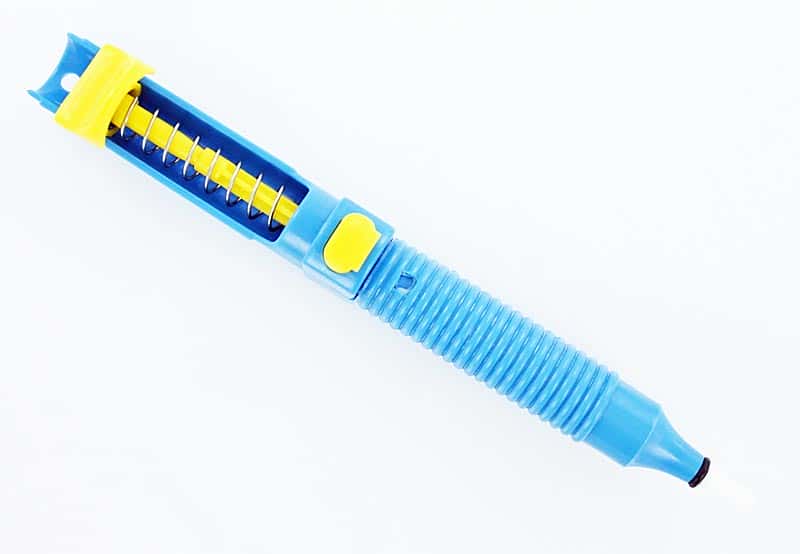
We’re always adding new electronic components, parts and supplies to our inventory. This week, one of our new products is a solder sucker, which is a ‘must have’ for anyone that works with electronics and solder.

Crafted in Germany by Amax, this solder sucker is a pump style solder remover. Use it on heated solder to remove the solder from your boards and components. It comes in the original manufacturer’s packaging with instructions for the use and care of your solder sucker.

Here are some basic desoldering instructions:
1. Heat your soldering iron. Push down on the plunger until it clicks to arm the soldering iron.
2. Clean your soldering tip. Place the soldering tip on the side of the old joint. Apply some fresh solder on the old joint to help the old solder soften.
3. Set the plunger on the solder sucker. Place the tip of the solder sucker on the old joint as close as possible to the soldering tip.
4. Release the plunger by pressing the button.
5. Repeat until much of the old solder is gone.
6. If any of the old solder is left in PCB holes, you can heat the old joint again and using the soldering tip on one side and a miniature flat screwdriver on the other, gently rock the joint back and forth lightly to loosen up the tiny leads on the components.
7. You may need to repeat this process again when there is a stubborn joint.
9. Remove your component carefully; taking care to not damage the board.

Microchips to be imbedded in pills?

Yes, it’s true. Proteus Biomedical has announced that they will be launching a innovative product that imbeds microchips in pills so that patients can be monitored by their health care professionals and even their families.

The purpose of the monitoring is to be sure that patients are taking their medications properly and on time and to also monitor a range of additional patient information including respiration rate, heart rate, temperature, sleep patterns and physical activity. It is estimated that up to 50% of all patients take their medication improperly so this will assist health care professionals and family member with the patient’s drug regimen.

The sensors are about the size of a grain of sand. The sensor-enabled tablets are called Helius. The Helius can be taken with pills or incorporated into medications by the drug manufacturers. Once ingested, the sensors are activated by stomach acid. Each sensor contains a very small amount of copper and magnesium which react with stomach acid to create the power necessary to generate a digital signal. Through an adhesive patch on the skin, the digital signal is read and and the data transmitted through the patient’s cell phone.

Don’t look for the microchipped pill just yet. Proteus Biomedical will be introducing their new product in the UK first.

The future of medical monitoring: Temporary tattoos in place of electrodes and wires

If you’ve ever had an EEG, you’ll remember all the preparation that was required to get you hooked up properly to the monitoring device. There was sticky gel and tape and those pesky electrodes. According to the journal “Science”, researchers have developed a patch which bends, wrinkles and stretches like skin. The patch would be applied to the body like a temporary tattoo and would contain the electronic components necessary for sensing, communications and relaying information from the body to a monitoring device.

In addition to the ease of applying these patches, another major benefit is that any testing could be conducted in a more natural and less stressful environment since results could be transmitted wirelessly to the monitoring equipment.

Not only could the patches contain the electronic components for medical monitoring, they could also be used with patients that have muscular or neurological disorders, such as ALS. The patch could facilitate communication with computers. In addition, the researchers have shown that when placed on the throat, the patch can detect muscle movement.

The patch is constructed in the shape of tiny wires called filamentary serpentine. This configuration allows them to be bent, twisted, scrunched and stretched while maintaining functionality and contact with the skin.